
Email management software features that actually do the work
Ideagen Mail Manager is the email filing and search add-in for Microsoft Outlook, purpose-built for architecture, engineering, and construction (AEC) firms.
It sits between a team's inbox and their project filing structure — SharePoint, network drives, ProjectWise, Procore or other storage — and uses machine learning to ensure every email is filed to the right place, findable in seconds and preserved as a permanent project record.

Originally built at Arup to solve Arup's own email problem, Ideagen Mail Manager has been refined over 20+ years across 2,600+ AEC firms and more than 48,000 users.
This page covers every major feature and how it connects to the two reasons AEC firms buy email filing software: preventing disputes and retaining institutional knowledge.

New Outlook for Windows
Your project email records stay intact as Microsoft transitions to New Outlook.
Microsoft is replacing Classic Outlook for Windows with New Outlook, a rebuilt version of the application that runs on a different technical architecture. For AEC firms where email is a commercial and legal record, the risk is clear: if your email management tool breaks during that transition, correspondence stops being filed and the project record develops gaps.
The same filing workflow, the same Prompt & Predict suggestions and the same Advanced Search all work with New Outlook; no retraining needed.
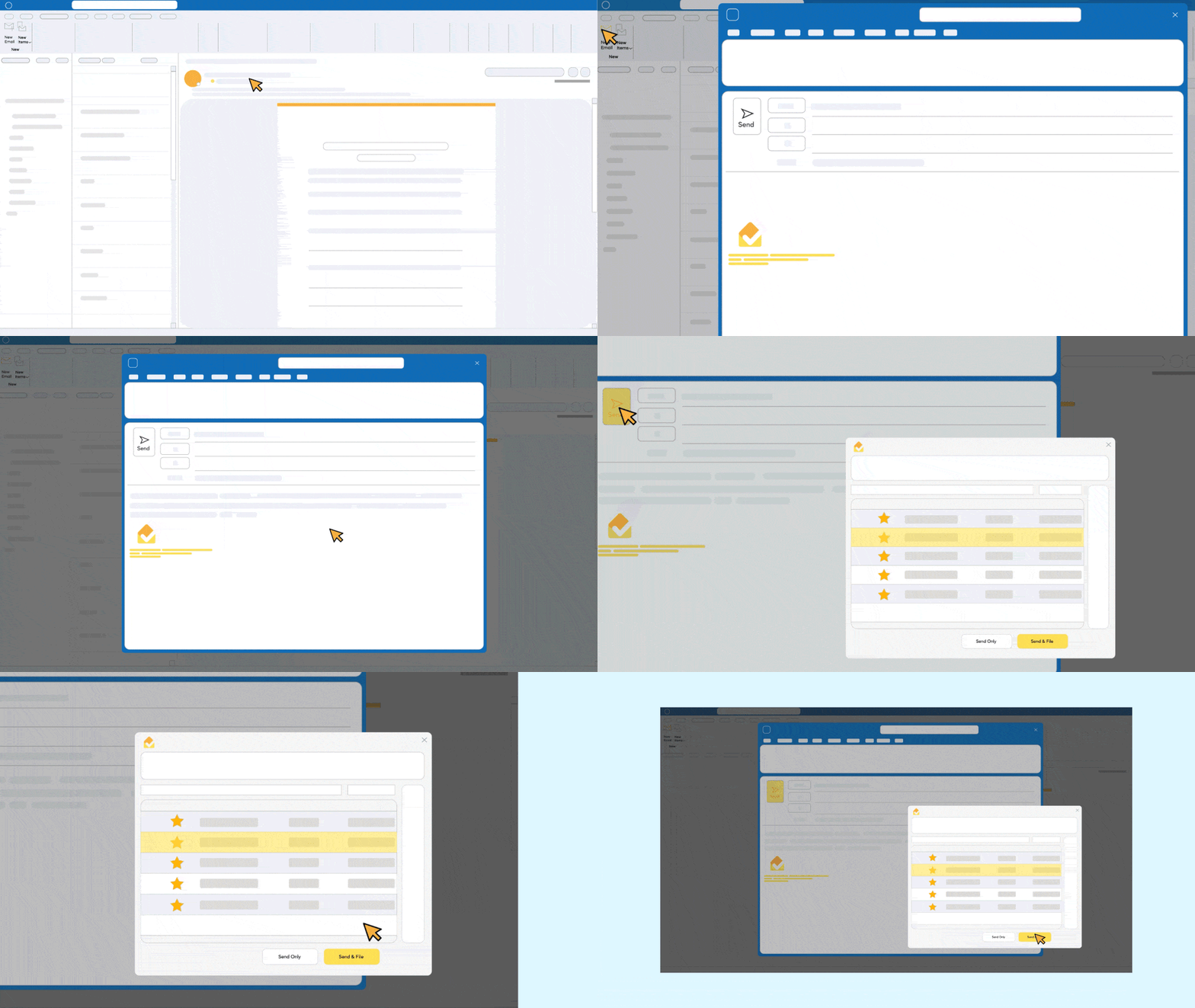
Prompt and predict
Never worry about someone not filing again.
Ideagen Mail Manager learns your behaviours to help prompt and predict where emails should be filed, meaning emails are filed as and when you send and receive them.

Automated filing assistant
The Filing Assistant handles emails that were not filed at the point of sending or receiving. It scans a user's inbox for unfiled emails and files them automatically based on customizable rules, catching the backlog that manual filing inevitably creates.
The Filing Assistant can be configured to run on a schedule, ensuring that even the least disciplined filer on the team does not leave gaps in the project record. This is particularly valuable for firms onboarding Ideagen Mail Manager on live projects, where months or years of historical correspondence may need to be filed retroactively.

Migration tools for legacy correspondence
When a firm adopts Ideagen Mail Manager or transitions from another system (such as Deltek PIM, Newforma, or a manual filing process), legacy correspondence needs to come with them. Ideagen Mail Manager's migration tools allow firms to import historical project emails from previous systems or disorganized filing structures into the current project filing environment.
This ensures that the project record does not start from zero. Emails from before the implementation are filed, indexed and searchable alongside new correspondence; critical for firms where projects span years and disputes can arise long after a project completes.

Rapid deployment
Ideagen Mail Manager can be installed and rolled out across an organization in under 24 hours. The deployment process involves five steps:
- Download the installer
- Configure license details
- Deploy to target machines
- Connect filing locations
- Start filing
Training and implementation support is included.
For IT teams, this means a low-risk implementation with minimal disruption. There is no server infrastructure to provision (the product is a client-side Outlook add-in), no data migration required upfront and no dependency on Ideagen hosting anything.

Integrations
We work closely with other technology providers to help meet increasingly complex customer needs. Together, we amplify the value that our individual software solutions produce by tapping into our respective areas of expertise. We believe that the technology we offer enables operational excellence, to ultimately free up your potential for stimulating and exciting work.
- Microsoft SharePoint
- Microsoft OneDrive
- Bentley ProjectWise
- Network drives
- Microsoft Teams
- Procore
- Viewpoint
Ready to see how Ideagen Mail Manager can help?
Get a free, personalised demo at a time that works for you.
Frequently asked questions
Ideagen Mail Manager uses machine learning, not generative AI. The Prompt & Predict feature learns from a team's filing behavior to suggest the correct filing location for every email. It does not generate content, summarize emails or use large language models.
Yes. Advanced Search indexes all filed emails across all connected filing locations. Any team member with access to the relevant project location can search and retrieve emails filed by anyone on the team, including people who have since left the organization. This is fundamental to how Ideagen Mail Manager prevents information loss.
Yes. Ideagen Mail Manager supports both Classic Outlook for Windows and New Outlook for Windows.
Nothing changes. Because Ideagen Mail Manager files directly to your own infrastructure (SharePoint, network drives, ProjectWise, etc.) and does not host any data, all filed emails remain exactly where they were filed. There is no data retrieval process and no vendor lock-in.
Filing an email into SharePoint manually requires leaving Outlook, navigating to the correct project library and uploading — typically 8 to 10 clicks per email. With Ideagen Mail Manager, the same action takes one click from inside Outlook, with the location suggested automatically. That difference is why firms like WSP use both SharePoint and Ideagen Mail Manager together.
AEC is the heritage market and the largest customer segment but Ideagen Mail Manager serves project-based businesses across many industries including legal, financial services, consultancy, defense, government and property. The key qualifier is that the organization works on projects where email correspondence carries commercial or legal weight.
Still have questions?
Visit out FAQs page for answers to further questions.